29 September 2026
Schedules
Schedules by Zone
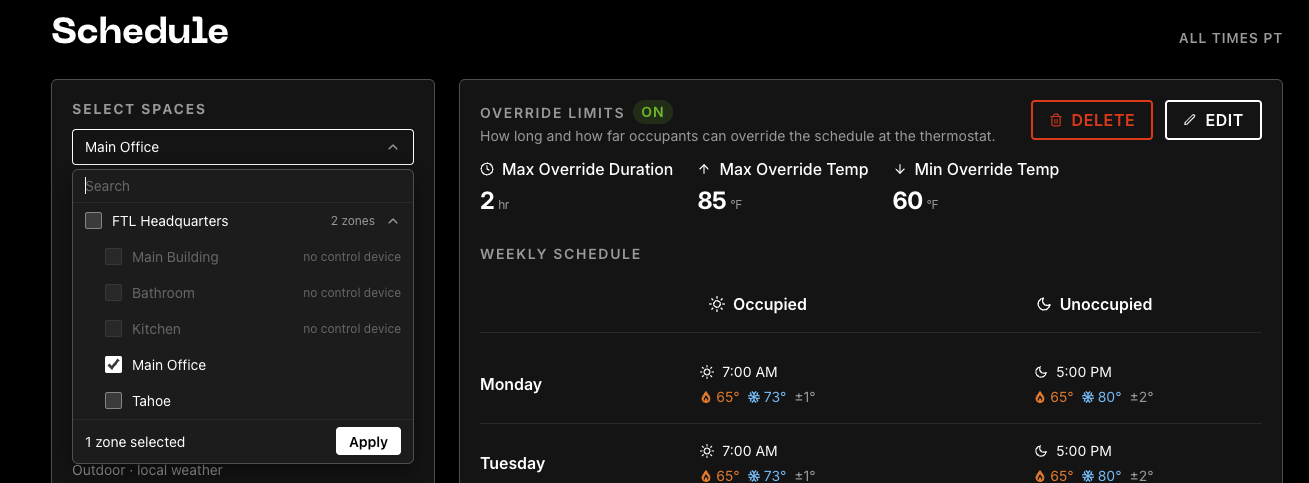
HVAC control schedules are now able to be set by zone, not just by site. Select what space you want to apply the schedule to in FTL Cloud and keep everyone happy with their own preferred temperature.

29 September 2026
Schedules
HVAC control schedules are now able to be set by zone, not just by site. Select what space you want to apply the schedule to in FTL Cloud and keep everyone happy with their own preferred temperature.
15 September 2026
Sensors
Humidity is now included as standard on all new FTL wireless temperature sensors. Humidity is an important part of both occupant comfort and asset health monitoring, and we wanted to make sure it was available to all of our customers and service providers.
1 September 2026
OCR, AI
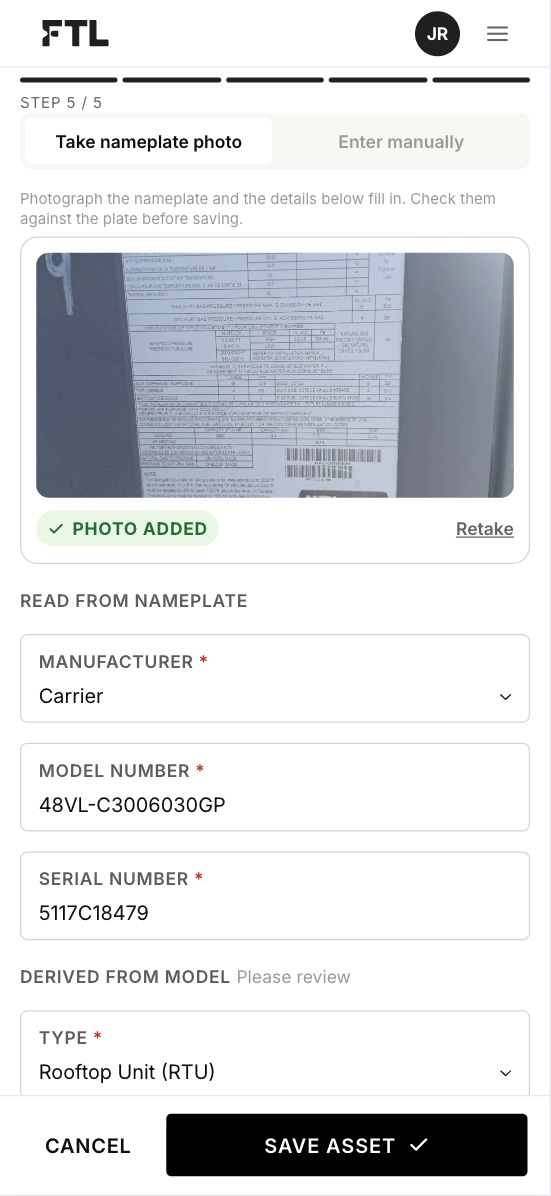
Easily and reliably add equipment during the provisioning process with our nameplate scanner. Just scan any nameplate with your phone, and we fill in all the asset details.
17 August 2026
Site
In order to better help multi-site facility managers, we just released favorites and groups! You can easily star sites you work with regularly, and filter by them.
1 August 2026
Control
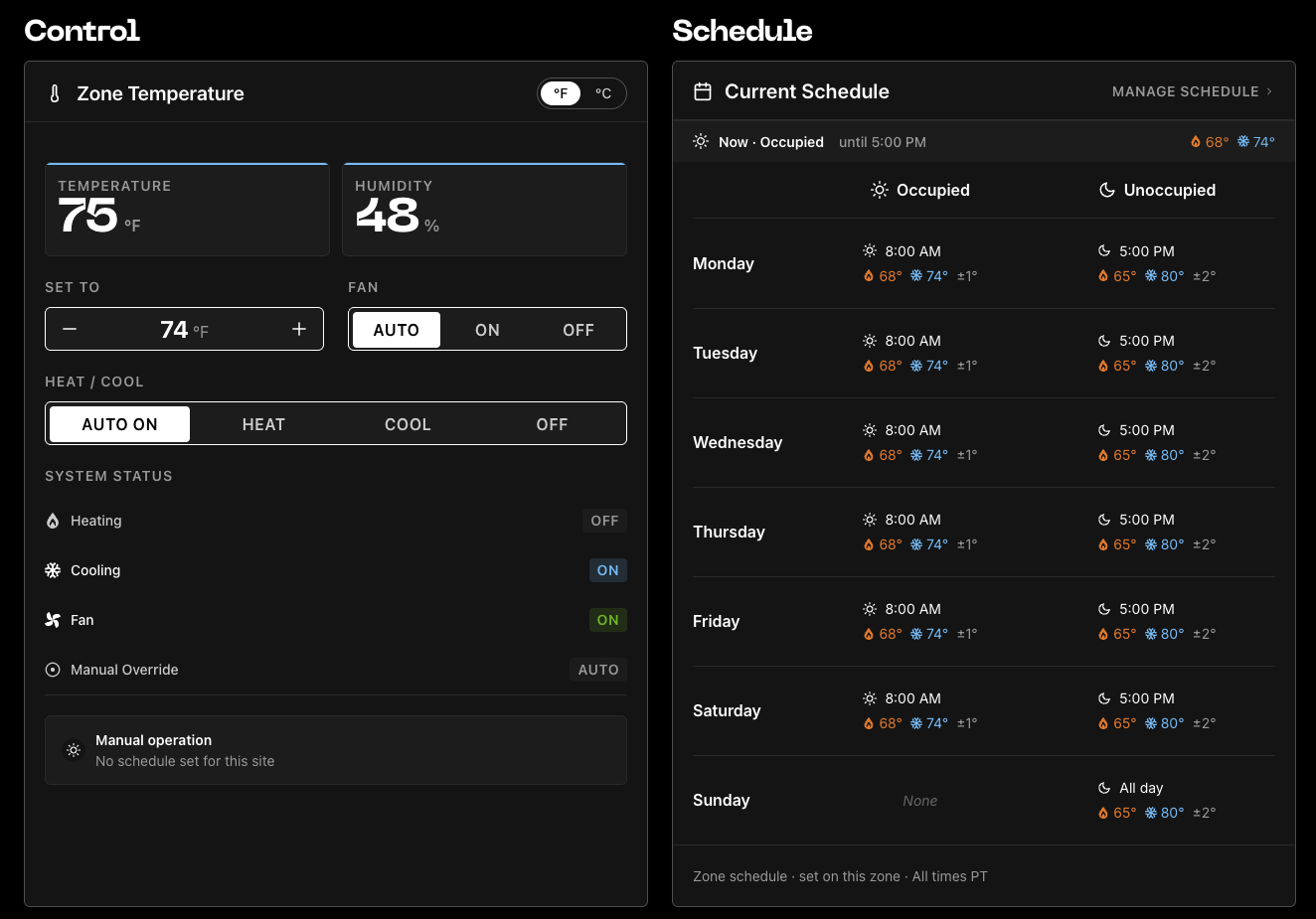
Control for HVAC package units is now online! With FTL, you can easily control comfort in a space, introduce a schedule, and lock out thermostats. Assets can be controlled from anywhere in the world using web or mobile, and on-site with our Terminal or Stat.
24 June 2026
Brick Schema
At FTL, we are committed to reducing the complexity of the built environment. Only then, can controls and automated buildings truly be accessible to everyone.
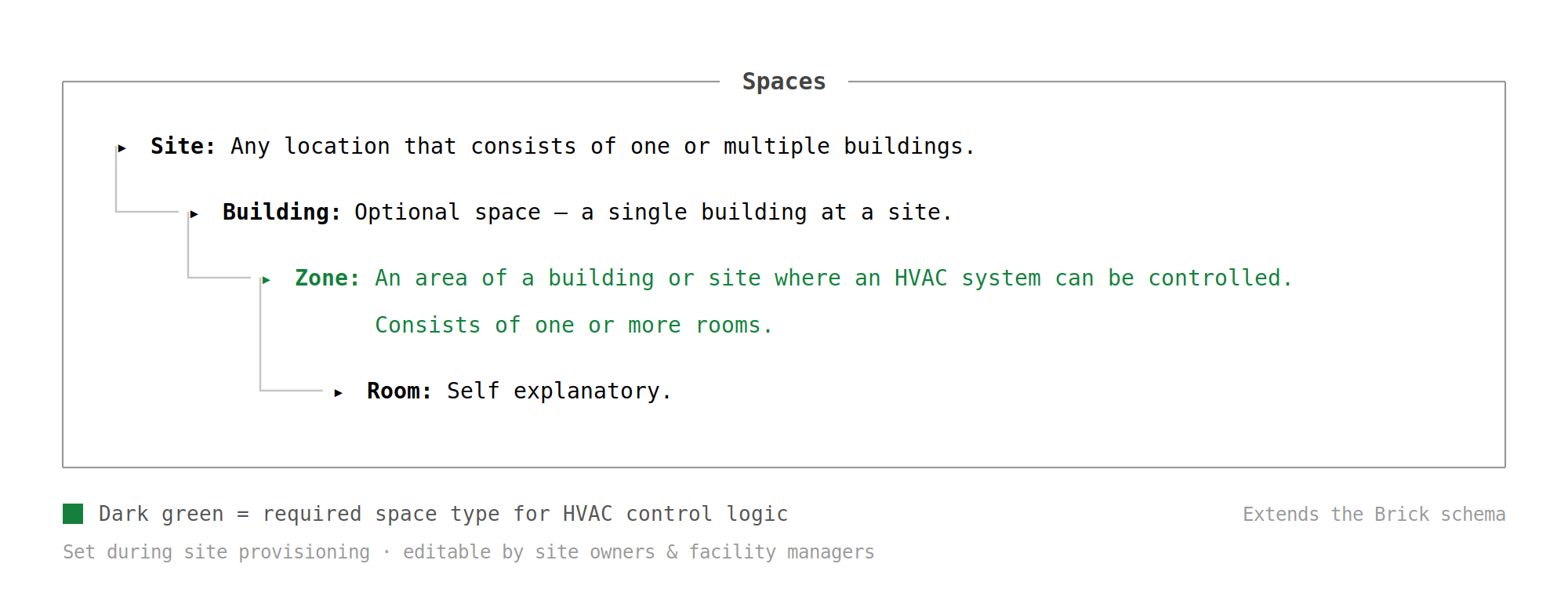
To this end, we are now introducing the concept of “Spaces”, building off of the Brick schema baseline. Our system now supports the following hirearchy:
Spaces will be configured by your technicain as a part of the site provisioning process, but will be editable by site owners and facility managers as needed.
01 June 2026
Authentication
So this is the tale as old as… well for me, at least 20 years, but it’s really as old as software. Build vs. Buy? Roll your own authorization/authentication (AuthZ & AuthN) or find an off the shelf solution? I’ve done both, several times. For a fast moving startup that needs to get going quickly, we decided to not spend the time now to build our own.
So initially I went with Auth0, just because I knew it and had used it before. However, I quickly found that the developer experience for Auth0 has gotten… more difficult. It’s still highly functional and probably a great solution for many, but it didn’t fit our needs. I discovered Clerk, and found it to be outstanding for just getting going.
We migrated completely in just a couple of hours, connecting our developer and staging environments. They have a generous free tier that we were happily using until we got the point of having enough people banging on it that we ran out of monthly emails. Pro tip: if you’re using Clerk on Vercel, and testing in preview environments - turn OFF the requirement to validate new logins via email for testing. It will definitely save you some time.
I won’t turn this into a sales pitch for Clerk, but suffice it to say, we’re very happy with our switch, and if you’re struggling with a home brewed solution or find Auth0, Okta or other Auth systems, Clerk is worth a try.
01 May 2026
Data Visualization
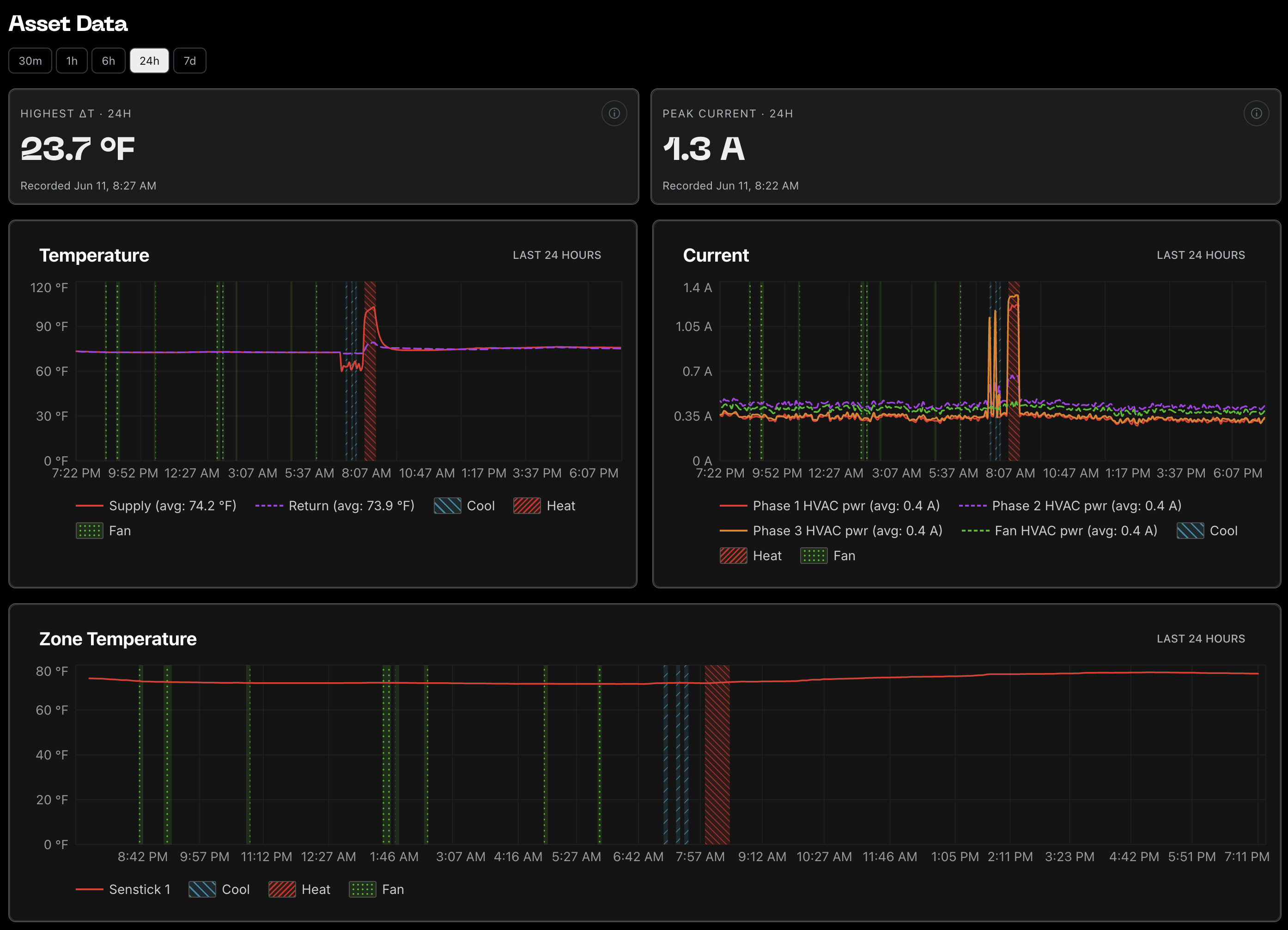
Now we’re cooking–or at least heating–with gas. More specifically, we’re able to see how those assets are doing! This is the biggest leap we’ve had so far - showing live asset data, allowing you to monitor the health of your RTUs, ducts, splits, etc. You can see at a glance if it’s healthy or failing, and technicians will be able to quickly diagnose what’s happening.
Our team has focused on measuring what matters and surfacing it to you. In addition to these metrics, we’re also surfacing external temperatures, specific supply and return temps, calls for heat and cool, as well as the sound the asset is making (useful down the road, we promise!).
Now, when you have a RAC or a REM connected to one of your assets, or a Thermostat or Senstick in your building, we can show you what’s happening. Your technicians will have a history of the health of the asset - and soon, we’ll be surfacing alerts based on this data.
15 April 2026
Brick Schema
We’ve started using the open source Brick Schema ontology to define our object hierarchy. Defining what is in the physical world with a common language is important for facility managers and service providers to be able to communicate effectively. We chose the Brick Schema as it’s widely adopted and well supported, allowing us to also communicate with partners in the future.
We are aiming for simplicity and flexibility with this hierarchy. Customers have a Site or Sites. A site is any piece of land, for our system it must have an address - mainly so that technicians know where they are going. A site can have any number of Buildings. A building is any confined structure. A site can also serve AS a building in our system, meaning it can contain Zones and Assets.
At FTL a Zone is currently any defined space, and for our purposes it will follow the Brick ontology’s definition of an HVAC Zone. This would be a place where you want to manage the temperature, so this will be where thermostats & sensticks (Stats & Sticks, familiarly) will go.
An asset is a piece of equipment in (or often, on top of) your building, such as a package unit, a mini split, a refrigeration rack, etc. These are the critical systems that keep your site or building comfortable and not melting your ice cream or freezing your produce. These are the things that FTL is here to help monitor with devices like our RAC (Remote Asset Controller) and REM (Remote Equipment Monitor).
So to sum up: Sites can have Buildings, Zones & Assets. Buildings can have Zones & Assets, and Zones can have Assets. Some devices attach to Zones, others attach to Assets. FTL will help you know what is going on in your sites by continuously reporting on the health of your assets, and we’ll help you maintain optimum environments by controlling them.
Finally, having a common definition of what things you have in our system gives you good control over who can access these things - users can have Site level access or sub-Site level access, so you know who can see and change what in your organization.